Watch a web page. See exactly what changed.
Watch a web page, or just the part that matters, and see what changed. Everything stays in your browser: no account, no subscription.
No Novair server: your pages, their versions and your settings stay in this browser. With Pro, api.gumroad.com receives the licence key, to check it.
Free · Pro EUR 32.50 + VAT where applicable
One payment, no subscription · 1.x updates included · refund within 14 days
Or compare two versions of a page in your browser: Web page diff online, free
- No account, no subscription
- No Novair server
- Firefox and Chrome
- English and French

How it works
Three steps, no account.
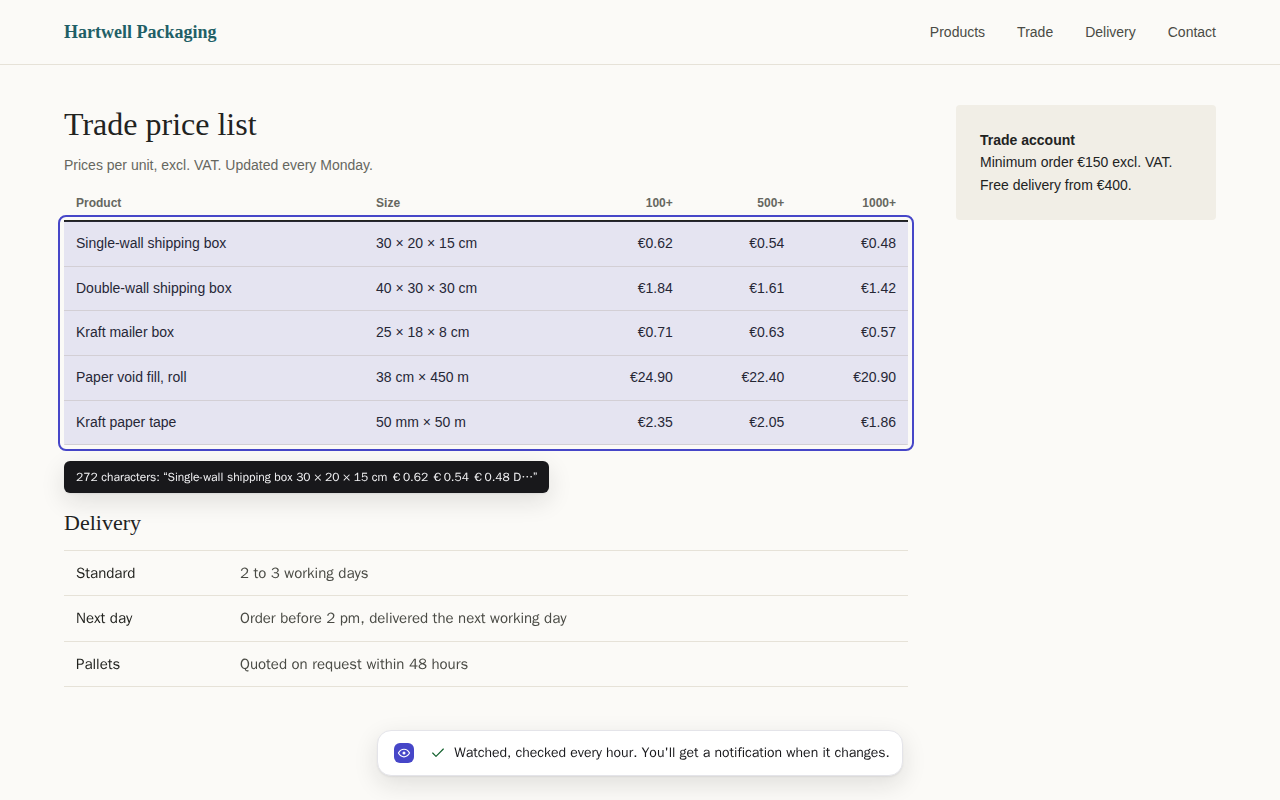
- Open the pageClick the Novair Watch icon, then “Watch this page”, or “Watch an area…” and click the part that matters: a list of tenders, a price, one section of the terms.
- Let it checkEvery hour by default, from every 5 minutes to once a day, while your browser is open. Dates and times that change at every visit don't count as changes.
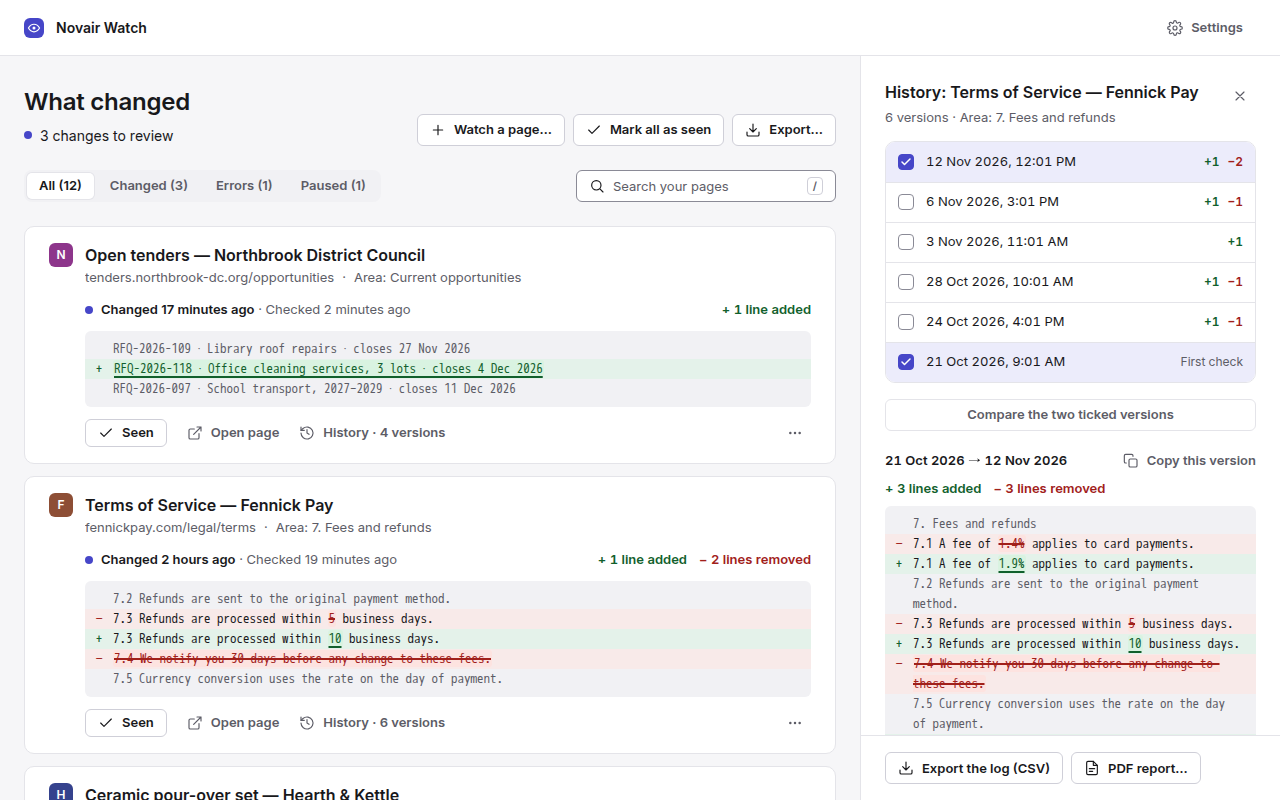
- See what changedA desktop notification, then the “What changed” dashboard: added text in green, removed text struck through.
See it at work
Real captures of the extension, on sample pages written by Novair. Click one to see it full size.
What the extension does
For the pages you would otherwise reload every morning: calls for tenders, terms of service and regulators' pages, competitors' prices and stock, careers pages.
The whole page, or one area
Click the part that matters (a list of tenders, a price, one section of the terms): only changes there count.
What changed, at a glance
One dashboard for all your pages shows each change in context, with the lines added and removed counted.
Fewer false alerts
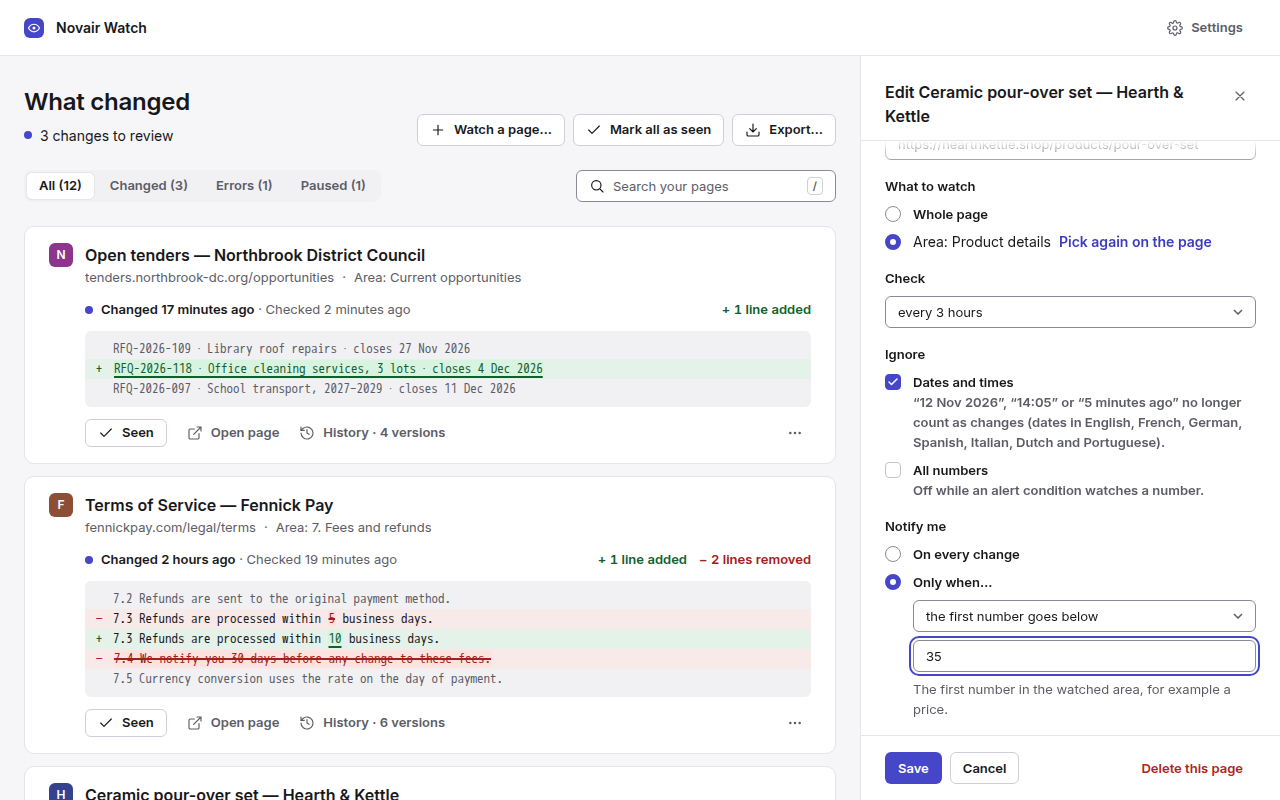
Dates and times that change at every visit are ignored by default, numbers too if you choose.
Every 5 minutes to once a day
Every hour by default, in Firefox and Chrome, while your browser is open. Pause or resume each page from the toolbar icon.
Unlimited pages, no account
Watch as many pages as you need, free and with no time limit. Nothing to sign up for, nothing to cancel.
Bring your list
Import a Page Monitor list (HTML), back up and restore your pages. A backup is a single file you keep.
Every version, dated (Pro)
Tick any two to see what changed between them, and copy the full text of the one you need.
CSV log and PDF report (Pro)
Each change with its date, the text added and removed and its SHA-256 fingerprint, for one page or all of them.
Alert conditions (Pro)
Be notified only when a text appears or disappears, or when a number (a price, for example) crosses a threshold or moves by more than the percentage you set.
Free, and Pro when you need it
For tenders, terms of service and competitors' prices: a dated record of what changed, and when. The free version watches your pages, notifies you and shows the latest change of each one, with no time limit. Pro keeps the whole record: every version, the CSV log, the PDF report, and alerts only when your condition is met.
Free
No time limit, no account.
- Unlimited pages, no account
- The whole page or just the area you pick, in one click
- Checks every 5 minutes to once a day, in Firefox and Chrome
- Desktop notification and dashboard
- Dates and times ignored
- Import a Page Monitor list (HTML), back up and restore your pages
- Every version and comparison
- CSV log and PDF report
- Alert conditions
Pro
One key, up to 5 browsers.
- Everything in the free version
- Every version of each page, dated, and comparison of any two
- Dated CSV log and PDF report
- Alert conditions
- Import a list of addresses from a CSV file
- All 1.x updates included
One payment, no subscription · 1.x updates included · refund within 14 days
Payment, invoice and VAT handled by Gumroad, merchant of record.
Frequently asked questions
Does it send my pages anywhere?
Novair Watch needs no account and uses no Novair server. Your pages, their versions and your settings stay in this browser. It connects only to the pages you ask it to watch, the way your browser opens them, and, if you activate Pro, to api.gumroad.com to check the licence key (once, then at most once a day). No analytics, no tracking.
What can't it watch?
Checks run while your browser is open; when it starts, late pages are checked first. Pages built by scripts after loading (some shops and web apps) may not be readable in this version: Novair Watch tells you as soon as you start watching one. A page behind a sign-in is checked while your session is open in this browser; sites that block automated reads can't be watched. Dates are recognised in English, French, German, Spanish, Italian, Dutch and Portuguese. Alerts are desktop notifications (no e-mail). Shortest interval: 5 minutes. Pages up to 10 MB.
Will a date or a counter trigger an alert?
Not by default: dates and times are ignored, and numbers too if you choose. You can also watch only the area that matters.
I already watch pages with another extension. Can I bring them?
Yes. Import a Page Monitor list (HTML), back up and restore your pages. With Pro, you can also import addresses from a CSV file.
What is the difference between free and Pro?
Free watches unlimited pages, notifies you and shows the latest change of each, with no time limit. Pro keeps every version, dated, compares any two, exports a CSV log and a PDF report, and notifies you only when your condition is met.
How much is Pro, and can I get an invoice?
EUR 32.50 + VAT where applicable, paid once: no subscription, nothing to cancel. Gumroad, merchant of record, shows the exact amount for your country at checkout. Need an invoice? Use “Generate” at the bottom of the Gumroad receipt; an EU business can enter its VAT number there.
In how many browsers can I use my key?
One key works in up to 5 browsers (Firefox or Chrome; each browser profile counts once). Reinstalling Novair Watch counts as a new browser: write to support@novair.app and we reset the count.
How do I activate Pro?
Click the Novair Watch icon › Settings › Pro licence, paste the key, then Activate. “Pro is active. Thank you!” confirms it.
Can I get a refund?
Refund within 14 days, no questions asked: reply to the Gumroad receipt or write to support@novair.app.
What about updates?
All 1.x updates included.