Web page diff · free · in your browser
Compare two versions of a web page
Paste the old and the new version of a page, as HTML source or as plain text. You see what was added and what was removed, line by line and word by word, the way Novair Watch shows it.
- No account
- Your texts stay in this page
- Dates and times can be ignored
This tool needs JavaScript: it compares the two versions inside your browser.
Tip: open the page, press Ctrl+U (View page source), select all and copy. Or open two saved .html or .txt files.
Want this done for you? Novair Watch checks the page on its own, every hour or as often as you choose, and shows you this view as soon as it changes. Free for Firefox and Chrome, no account.
See Novair WatchThe example is a fictitious terms of service page written by Novair.
How it works
Paste or open
Paste the HTML source or the text of each version, or open two saved .html or .txt files, up to 10 MB each.
Compare
The visible text is extracted, scripts and styles left out, then compared line by line; inside a changed line, the changed words stand out.
Fewer false alarms
Dates and times in English, French, German, Spanish, Italian, Dutch and Portuguese are ignored by default, so a “last updated” line doesn't count as a change.
Let the page be watched for you
Watch a web page, or just the part that matters, and see what changed. Everything stays in your browser: no account, no subscription.
- The whole page or just the area you pick, in one click
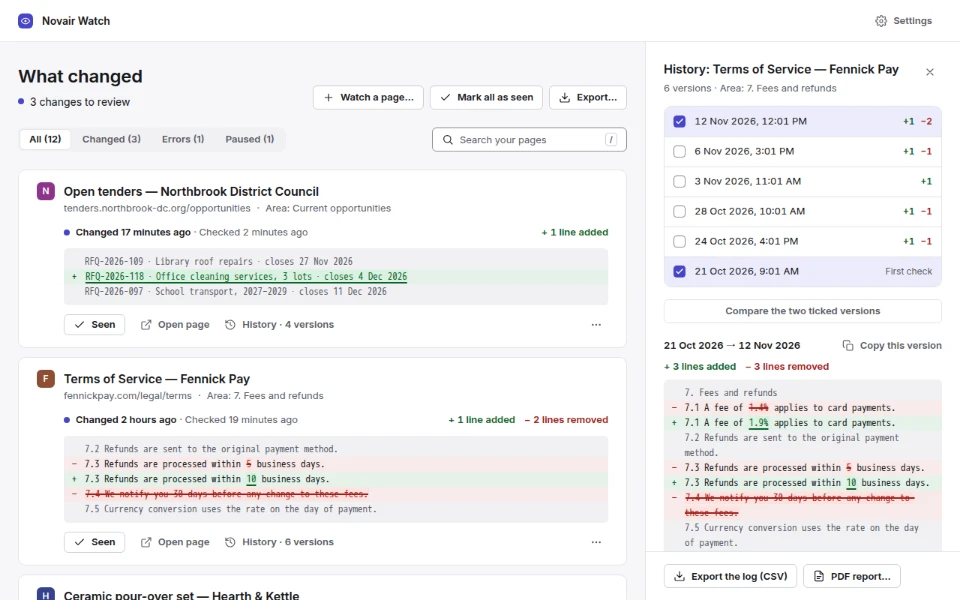
- A desktop notification when a page changes, and one dashboard of what changed, added and removed text highlighted
- Ignore dates and times to avoid false alerts, and numbers too if you choose
- Every version of each page, dated, and comparison of any two (Pro)
Questions
Is my text sent anywhere?
No. The comparison runs in this page, in your browser: the page is not allowed to make any network request (Content-Security-Policy connect-src 'none') and keeps nothing once you close it.
Can it fetch a page from its address?
No: a web page can't read another site's page from your browser without a server, and this tool has none. Paste the source instead, or let Novair Watch fetch the page for you: the extension reads it the way your browser opens it.
What does “ignore dates and times” do?
Dates and times such as “12 Nov 2026”, “14:05” or “5 minutes ago” are masked before comparing, in English, French, German, Spanish, Italian, Dutch and Portuguese. The lines are still shown as they are.
How large can the pages be?
Up to 10 MB each. Beyond 50,000 lines on one side, only the counts are shown.